Navigating a Large Character Library
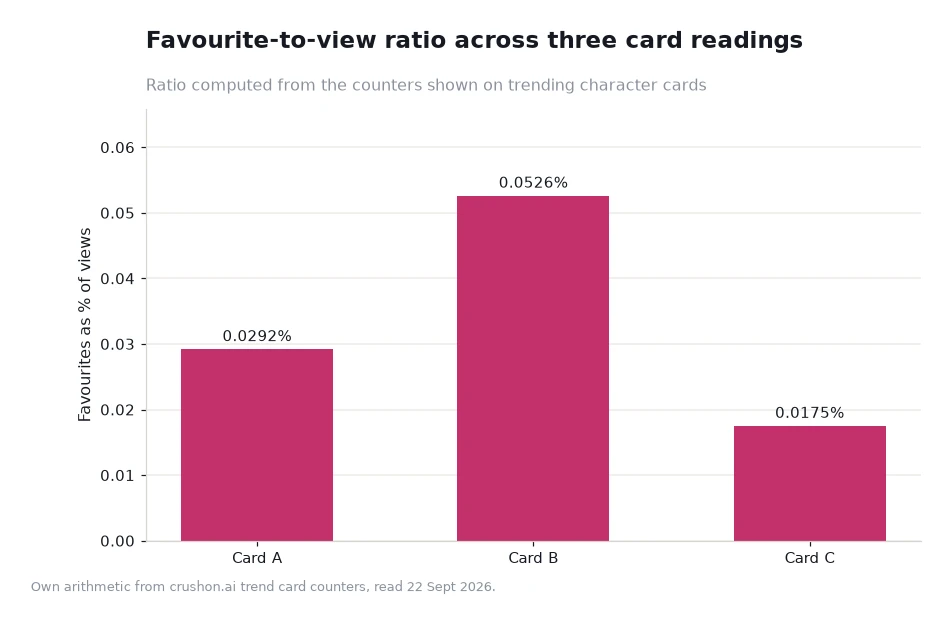
A large character library is a navigation problem before it becomes a choice problem, and the fix is to decide how you will narrow before you start browsing. There are three separate entry points into the catalogue and a stack of filters behind each one, which is why an unplanned browse tends to end on the same six cards every week. One reading of scale: a single trending card showing 7.1K favourites against 24.3M views converts at about 0.0292%, so the library is very much larger than the handful of names any one reader sees.

Key takeaways
- Three routes lead in: the home grid with its Recent Hits and Animated sections, the search page with its tag chips and weekly lists, and the trends page with its twenty-entry chart.
- Filters stack. Adding a gender filter to an access label such as Unfiltered, Filtered or 18+ cuts the visible set twice over.
- Creators and Characters are separate lists, so a name found in one is worth checking against the other rather than assumed absent.
- The trends chart is rebuilt every Thursday, which makes a written note a better index than a remembered position.
Three ways into the library
The home grid is the browse route. It mixes sections such as Recent Hits and Animated with a gender filter, and it is built for people who do not yet know what they want. Its weakness is recency bias: the grid shows what is moving now, not what has been good for a year.
The search page is the lookup route. It offers popular tag chips, filter controls for Filtered, Unfiltered and 18+, and the Latest Weekly Rankings lists, which are rebuilt every Thursday and split between Creators and Characters. This is the route for a reader who has a label in mind and wants to see everything behind it.
The trends page is the third route, and it is the most explicit: twenty entries with a view count and a favourite count on every card, plus a creator credit. It answers the question "what is working right now" better than either of the other two, and it is the only one of the three that gives you numbers to compare.
Stacking filters without losing the thread
Filters are cumulative, and the practical consequence is that each additional condition narrows the set faster than readers expect. An access label alone leaves a large pool; adding a gender filter cuts it again; adding a specific label takes it down to a screenful. If a combination returns almost nothing, the usual cause is one filter too many rather than a gap in the catalogue.
There is also a policy layer underneath the filters. Unfiltered, Filtered and 18+ describe which part of the catalogue you are seeing, and the platform states that some limitations apply under its content and community guidelines. Navigation is faster once that is settled, because you stop re-testing the boundary on every card, and a Porn Chat AI catalogue is easier to move around once the access question is answered rather than revisited.
| Route | Best for | Narrows by | Keep it useful by |
|---|---|---|---|
| Home grid | Browsing without a target | Recent Hits, Animated, gender | Visiting weekly, not daily |
| Search | A label you already know | Tag chips plus access filters | Running the label alone first |
| Trends chart | Comparing what is working | Twenty ranked entries with counters | Re-reading after Thursday |
| Creator lists | Finding a house style again | Creator name rather than card | Noting names, not positions |
Worked example: how fast a browse narrows
Suppose a reader starts with an access label and gets a large grid. The three card readings in the chart that follows sit at 0.0292%, 0.0526% and 0.0175% favourites against views. Convert the first: 7,100 ÷ 24,300,000 = 0.000292, or 0.0292%. Divide the strongest reading by the weakest and you get 0.0526 ÷ 0.0175 ≈ 3.0, so the best card in that set saves roughly three times as often as the weakest.
Now apply that to a filter stack. Assume the opening grid offers 200 visible cards, the gender filter halves it to 100, and a label takes it to 20. If you open eight of them and keep two, your keep rate on the filtered set is 10%, against 1% on the original grid. The card count is an illustrative assumption about a browse, not platform data, but the shape of the arithmetic is the argument for filtering first.
A second calculation sets a budget for the session itself: six opens at two minutes each is 12 minutes, and three such sessions a week is 36 minutes weekly, or about 144 minutes a month. That is the size of task navigation really is, once the filter stack does the heavy lifting.
Keeping the library small
The goal of navigation is not to see everything, it is to end up with a set you can return to without re-searching. Write down five names with the label route that produced each one, and the next session starts in seconds instead of minutes. That written index is also the only thing that survives the weekly reshuffle, since positions move and labels do not.
Two routes make the index easier to maintain. Use the character search to confirm that a new name really belongs to the label set you rely on, and re-read the weekly rankings once a week to see whether anything has displaced a name you already keep. On a busy porn ai chat catalogue the difference between a five-name list and a fresh browse is the difference between a routine and a search project.
One habit makes the three-route model easier to hold: leave each route by the door you entered it. If a browse produced a keeper, write down the label; if a search produced one, write down the search term. Route notes are what turn a lucky find into something repeatable on purpose.
Frequently asked questions
Should I start with search or with the home grid?
Start with search if you can name what you want, and with the grid if you cannot. The grid is for discovery, search is for confirmation, and the trends chart is for comparison.
Why does the same filter return different results a week later?
Because the catalogue and its rankings move. The weekly lists are rebuilt every Thursday, so a search that returned twenty results last week may return a different twenty now.
Is a large library a good thing?
Only if you filter. Size is what makes a narrow combination worth running, and the same size is what makes browsing without a filter exhausting.
How do I remember what I found?
Record the name, the label combination and the date. The label route is the part that stays reproducible when the chart has been reshuffled.
Filter first, then browse
Navigation rewards a fixed order: pick a route, apply the access filter, add one more condition at most, then open a small number of cards and decide. Do that twice a week and the library stops feeling large, because the part you actually use stays at five names while the rest remains available behind the filters. The library's size is only a problem when it is approached without a plan.
Data and sources: catalogue navigation, filter structure and the weekly chart on the Crushon trends page[1], read 22 Sept 2026. Ratios are own arithmetic on card counters; card counts and session lengths are illustrated assumptions. Written for adults aged 18+.